

• IA-03
  • Industrial Automation · course 3 of 5
  • Graded practical

HMI and SCADA Design

Three weeks on screens operators can actually run a plant from: hierarchy, alarms, trends and the data behind them.

weeks
3
live classes
6
graded practical
1
start any time
On demand
Outcomes

What you'll learn

  • Design a screen hierarchy an operator can navigate under pressure
  • Apply high-performance HMI principles: grey backgrounds, colour only for abnormal
  • Build an alarm system that does not flood the operator
  • Configure trends, historians and the tags behind them
  • Connect the HMI to the PLC and verify every tag
  • Test a screen with an operator, not just with yourself
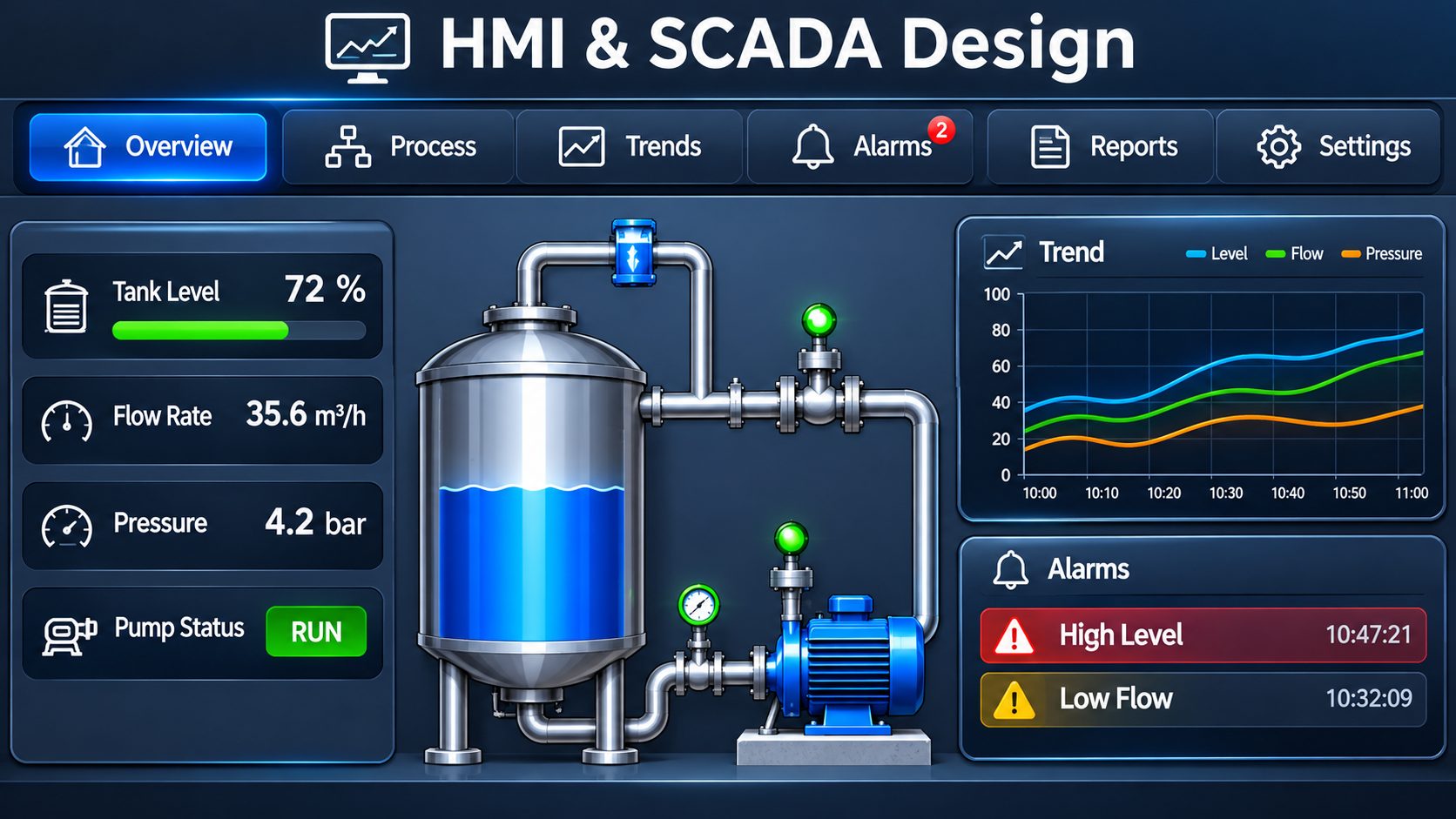
HMI and SCADA overview screen with tank level, flow and pressure readings, a live trend and an alarm list
Course data sheet
Code
IA-03
Track
Industrial Automation, weeks 11–13
Level
Core
Prerequisite
PLC Fundamentals, or experience with any PLC
Starts
On demand · begin the week you enrol
Live classes
Tue and Thu 19:00–21:00 WAT, 6 sessions
Clinic
Sat 10:00–12:00, 3 sessions
Assessment
1 graded practical, 2 quizzes
You need
A laptop, Chrome, about six hours a week
Why HMI design

The operator sees your screen, not your code. A bad screen causes incidents; a good one prevents them.

Walk into most control rooms and you will see rainbow-coloured screens with 400 alarms standing and an operator who has learned to ignore the horn. Every major incident report has a page on the HMI. The engineer who can build a screen that shows the abnormal clearly, with alarms the operator trusts, makes the whole plant safer and is in demand across every industry.

This course is three weeks of building the real thing. You design a hierarchy, build the overview, unit and detail screens for a packaging line, configure alarms to ISA 18.2 principles, add trends and connect everything to a live PLC model in the MAT Lab. An automation engineer grades your screens against the rubric and an operator walkthrough.

Hands-on
9 hours in the lab over three weeks
Graded by
An automation engineer who has built SCADA for live plants
You keep
A working line HMI with alarm handling on your portfolio
Counts toward
The Industrial Automation track
Syllabus

Six sessions, three weeks

  • 12-min pre-class video
  • Live class
  • Quiz
S1What an operator needs

Situation awareness, hierarchy of screens, navigation in two clicks; the ISA 101 model.

S2High-performance HMI

Grey backgrounds, colour for abnormal only, analogue indicators, trend-first design; before-and-after examples.

S3Alarm management

Priorities, deadbands, shelving, flood suppression; ISA 18.2 in practice.

S4Tags, trends and historians

Tag databases, scaling, trend configuration, what to log and for how long.

S5Building and connecting

Overview, unit and detail screens for the line, connected to the PLC model; tag verification.

S6Operator walkthrough and practical review Practical due

An operator (your classmates) runs the line from your screens; practical submission due.

LINE 3 · OVERVIEW · HMI TEST2 ALARMS · 0 STANDING
Screens
7
Tags verified
184 / 184
Nav depth
2 clicks
Graded practical

Build the line HMI with alarm handling.

In the MAT Lab you build the overview, unit and detail screens for a packaging line, configure the alarm system with priorities and shelving, add trends, and connect it all to a live PLC model. Your instructor grades the screens, the alarm philosophy and an operator walkthrough; it goes on your portfolio.

How the practical runs

From a blank project to screens an operator trusts, in five steps

You are given a packaging line, a tag list and a rubric. Then you build what the control room would actually use.

  1. 1

    Design the hierarchy

    Sketch overview, unit and detail screens and the navigation between them before opening the software.

  2. 2

    Build the screens

    Grey backgrounds, analogue indicators, colour only for abnormal; consistent symbols.

  3. 3

    Configure alarms

    Priorities, deadbands and shelving; a one-page alarm philosophy.

  4. 4

    Connect and verify

    Link every tag to the PLC model and verify it live; add trends.

  5. 5

    Operator test

    A classmate runs a start-up and a jam from your screens; defended at the Saturday clinic.

Who this course is for

Engineers and technicians who are tired of guessing

Automation engineers who build screens by copying the last project. Operators and technicians who want to move into controls. Anyone who has been asked to "add a screen" and wants to do it properly.

What you walk away with

Skills you can use on Monday, and proof you have them

A method for designing screens that make plants safer, and the software skills to build them. A working HMI on your public portfolio. A certificate of completion with a verification code. Credit toward the full Industrial Automation track, where the next course connects your HMI to the plant network.

Automation engineer in a hard hat working at a PLC rack in a field control cabinet, laptop open on the ladder logic
Your instructor

A practising automation engineer who programs PLCs for a living

Lead instructor · Industrial Automation track

8+ years on live plants · currently in industry · grades every practical personally

This course is taught by the Industrial Automation lead for your cohort, a practising engineer who does this work on real plants and grades every practical personally. Faculty rotates by cohort, so you meet your instructor on the orientation call.

Track

Course 3 of 5 in Industrial Automation

Courses in the Industrial Automation track
CodeCourseWeeksPriceLink
IA-01 PLC Fundamentals Weeks 5–7 ₦150,000 View PLC Fundamentals
IA-02 PLC Programming: Ladder, ST and FBD Weeks 8–10 ₦150,000 View PLC Programming: Ladder, ST and FBD
IA-03 HMI and SCADA Design Weeks 11–13 ₦150,000 This course
IA-04 Industrial Networks Weeks 14–15 ₦150,000 View Industrial Networks
IA-05 Motor Control, VFDs and Commissioning Weeks 16–18 ₦150,000 View Motor Control, VFDs and Commissioning

Take all five and you've completed the track. Already done three? Upgrade to the full track (₦700,000) for the difference.

See the full track
FAQ

Questions

Which SCADA package is used?

One of the mainstream packages common on Nigerian plants, confirmed at enrolment. The design principles are vendor-neutral and the course shows where the same features live in two other packages.

Do I need to know PLC programming?

You need to understand tags and I/O; PLC Fundamentals or equivalent experience is enough. The PLC model in the lab is provided.

Does this count toward the track?

Yes. It is course 3 of 5 in Industrial Automation. Finish three courses and you can upgrade to the full track for the difference.

What do I get at the end?

A certificate of completion with a verification code, and your graded practical on your public portfolio.

HMI and SCADA Design · on demand

₦150,000 · three weeks · one graded practical

Enrol

Cohort 1 starts 15 January 2027

75 places across three tracks. Applications close when the cohort fills.